PaloAlto Networks discover Vulnerability in Android Installer which may lead to hijacking of Android and expose users to Malware installation without their consent.
Malware Distribution has always be the favorite work of Cybercriminals to attack the users and get money out of it. Whether Banking malware or whether System malware, each of them have same target - making money for their author. Malware are spread by their authors in various ways. Everyday Researchers discover these new ways cybercriminals follow to spread malware but sometime we get tricked by our own mistakes. Vulnerabilities in our system may lead to exposure of a another modus operandi to be used by cybercriminals to spread their malicious programs and harm computers.
Apart from vulnerabilities in PCs and Softwares, we come across vulnerabilities in Android OS also, used by all leading Smartphone manufacturers such as Google, Samsung, Sony, HTC, LG etc.
Recently, PaloAlto Networks have discovered a serious vulnerability in Android Installer leading to complete Hijacking of Android OS smartphone and could expose users to Malware. PaloAlto Networks described this as a "widespread" vulnerability found in Google's Android OS and dubbed it as Android Installer Hijacking Vulnerability. It is roughly estimated to impact about 49.5% of Android users.
Key points about the Android Installer Hijacking Vulnerability
- attacker can leverage the vulnerability to outplace a genuine app with malware without user's consent. This only affects applications downloaded from third-party app stores.
- the malware installed can take over full control over the Android OS and complete device, exposing the user accounts, sensitive credentials such as passwords etc.
About the Vulnerability
In January 2014, PaloAlto security Researchers discovered a Time-of-check to Time-of-use (TOCTTOU) Vulnerability in Android OS. It was then reported to Google and Samsung for release of patches for their devices. Basically under this vulnerability, the attacker exploits the Application Installer of Android, suffering from a race condition (TOCTTOU) vulnerability. This hijacking can circumvent installation process easily and without user's knowledge, can install malware onto device. It simply attempts to bypass user view and distribute malware with arbitrary permissions.
"It can substitute one application with another, for instance if a user tries to install a legitimate version of Angry Birds and ends up with a Flashlight app thats running malware. We are calling the technique that exploits this vulnerability Android Installer Hijacking. We have been cooperating with Google and major manufacturers such as Samsung and Amazon to patch affected Android devices", stated the post by PaloAlto Networks.
Description of Vulnerability
The PackageInstaller on Android has TOCTTOU vulnerability that can be triggered if the applications are downloaded from third-party app stores or installed from local storage such as using direct APK files.
"The Installer Hijacking vulnerability affects APK files downloaded to unprotected local storage only because the protected space of Play Store app cannot be accessed by other installed apps."
Process of App Installation
To understand the vulnerability, let's first understand how an application is installed on to an android device.
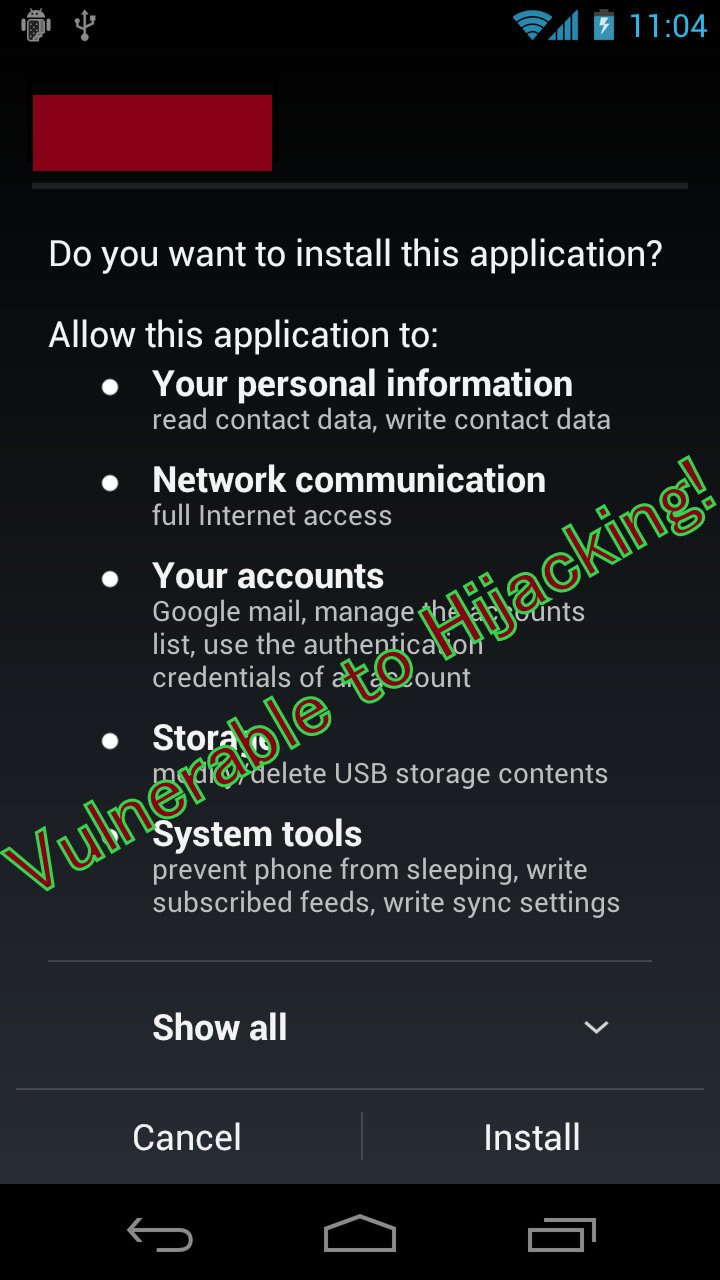
The system service PackageInstalled starts the installation process by parsing the APK file and retrieves critical information about the app, such as the app name, app icon and the security permissions that the app requests. This is presented to the user in a PackageInstallerActivity view on the screen, as seen below.
This process is called "Time to check" because during this time, the system verifies if user really want to install the app. User authorizes the system with permissions to perform. All android apps perform this step. After this users click "Install" and the process starts.
The vulnerability exists in this process because while the user is reviewing this information, the attacker can modify or replace the package in the background. Verified with Android OS source code posted in AOSP, it shows that the PackageInstaller on affected versions does not verify the APK file at the Time of Use. Thus, in the Time of Use (i.e., after clicking the Install button), the PackageInstaller can actually install a different app with an entirely different set of permissions.
Exploitation
This vulnerability can be exploited in multiple ways:
Method A: Externally modifying the APK
The attacker can use a benign-looking app to install malware in the future. This method has several stages:
- Victim installs App X which appears legitimate. This app does not require any particularly dangerous permissions, and it can come from any normal app store.
- At a later date, the victim installs a perfectly legitimate app store (e.g. Amazons App Store app) which then allows the user to install APK files from local file system. Whenever the user attempts to install apps from this app store a PackageInstallerActivity view will been launched.
- The user sees an app from the legitimate 3rd party app store and attempts to install it. We will call this download App Y.
- The app from step 1, App X detects that PackageInstallerActivity view has been launched, and checks if the APK file of App Y is on an unprotected file system. If the app is being installed from a public file system (e.g., on /sdcard), then App X can overwrite the App Y with malware while the user is reviewing the permissions screen.
- After clicking Install, PackageInstaller will install the compromised App Y APK with the malware. Arbitrary code is now installed on the device, with any permissions that the attacker needs.
One tricky question with Method A would be how the App X detects that the PackageInstallerActivity view has been launched. There are two approaches here:
- The App X can monitor the logcat to detect the app installation and get the information of apk file location to replace the file. This is straightforward on Android <4.1. For Android >=4.1, only rooted devices can access logcat.
- The App X can monitor the location of directory where the targeted app saves the APK files downloaded for installation. For example, the Amazon Appstore app version 7.5 stored the APK file downloaded in a directory on sdcard without protection. When the user downloads the APK file from the Appstore app, a new APK file will appear in this directory. The App X does not need to know which file this downloaded file is. When the file appears, it means the installation view (Fig 1) is already popped up on the screen for user to review. So, the App X app can replace this APK file by its malware app at that time. (Please note that Amazon fixed this issue after receiving our report.)
Method B: Self modifying the APK
This exploit can take advantage of the same vulnerability to mask what permissions the app really requires.
- Victim installs App X which appears legitimate. When the user is using App X, it promotes a legitimate App Y (e.g. a popular game app) to the user for installation. If the user installs the app, the PackageInstallerActivity view will start.
- As discussed above, the essential information of App Y will be shown in the PackageInstallerActivity view. The App Y does not appear to ask for anything out of the ordinary. In fact, the App Y may not ask for any permission at all.
- When the user is viewing the PackageInstallerActivity, App X rewrites the APK file of App Y with malware.
- When the user clicks Install, the modified version of App Y will be installed, ignoring the actual permissions requested.
- The app actually installed may not be related or similar to App Y in any way.
Affect of Vulnerability
The vulnerability has found to be affecting both the Android device uers as well as app developers.
"Android app developers are also affected, because app-store apps and mobile ads libraries that do not rely on Google Play store would be likely to save the promoted apps in unprotected storage, e.g. /sdcard. Like the example we show with Amazon appstore app, the unprotected storage in /sdcard may allow attackers to replace the promoted apps with malware apps."
PaloAlto Networks successfully tested the exploits against Android 2.3, 4.0.3-4.0.4, 4.1.X, and 4.2.x. According to Android Dashboard, this vulnerability affected approximately 89.4 percent of the Android population as of January 2014 (when we first discovered it), and approximately 49.5 percent of the Android population as of March 2015.
Be aware that some phone vendors Android 4.3 distributions may contain this vulnerability as well.
Android version 4.4 and later versions have fixed this vulnerability.
Mitigation
- Only install software from Google Play in affected devices. These files are downloaded into a protected space, which cannot be overwritten by the attacker.
- Deploy mobile devices with Android 4.3_r0.9 and later, but keep in mind that we have found that there are some vulnerable Android 4.3 devices.
- Do not provide apps with permission to access logcat. Logcat is a system log, which can be used to simplify and automate the exploit. Android 4.1 and later by default forbid apps from accessing logcat of system and other installed app. But an installed app could still manage to get access to other apps logcat on rooted mobile devices with Android 4.1 and later.
- Do not allow users to use rooted devices.
Also, PaloAlto Networks worked with Google, Samsung and Amazon to fix the vulnerability and released a working demonstration of the vulnerability exploitation.
After this, PaloAlto Networks have also released an Android app to Scan if the android device is affected by this vulnerability. You can find the application here and view the demo for scanning the vulnerability using this Installer Vulnerability Scanner app.
Download the CDI Official Android App to have news directly on your phone.