Trend Micro researchers Jaaziel Carlos, Jonh Chua, and Rodwin Fuentes came up with another analysis report showing the discovery of another Ransomware family dubbed "PE_VIRLOCK". But here comes the interesting fact that surrounds this New breed of Ransomware. VIRLOCK is a ransomware which is detected to be infecting files as well as doing the routine job of locking the computer screen demanding some ransom.
About the Malware and its Routines
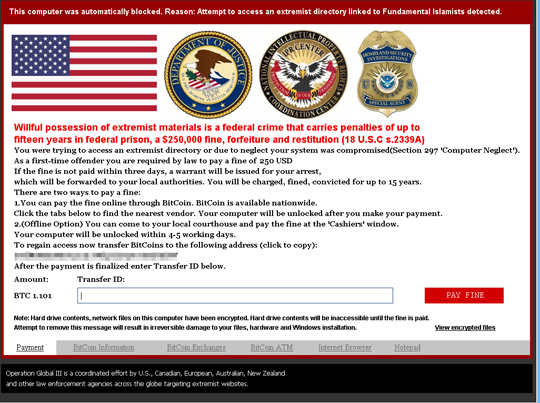
The first Variant of VIRLOCK ransomware was found in CARBANAK/AUNAK targeted attack campaign as the report states. Below is the general routine that VIRLOCK follows: Upon successful entry to the Victim's system, entries in the registry files are modified as a part of evasion technique. After that, it simply executes, locks the computer screen disabling explorer.exe and taskmgr.exe and then the final step of displaying ransom message is performed.
 The Ransomware has successfully been able to affect diversified networks over the globe, that shows the below infographic.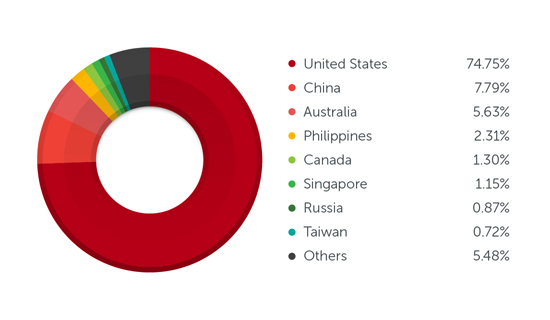
Technical Details
Infection Routine
As mentioned, VIRLOCK also has file-infecting routines. Once in the computer, PE_VIRLOCK checks for specific file types, including the following: Executable files (*.exe) Common Document files (*.doc, *.xls, *.pdf, *.ppt, *.mdb) Archive files (*.zip, *.rar) Audio/Video files (*.mp3, *.mpg, *.wma) Image files (*.png, *.gif, *.bmp, *.jpg, *.jpeg, *.psd) Certificate files (*.p12, *.cer, *.crt, *.p7b, *.pfx, *.pem) Malware finds the targeted files and then it encrypts them and embeds it in the malware body. It will also add a .RSRC section to the infected file. The .RSRC section includes the resources used by the executable that are not considered part of the executable, such as icons, images, menus, and strings. VIRLOCK uses that section to store the resources of the host file. When the infected host file contains an icon similar to the original icon of the host file, it can trick unsuspecting users into executing the infected files.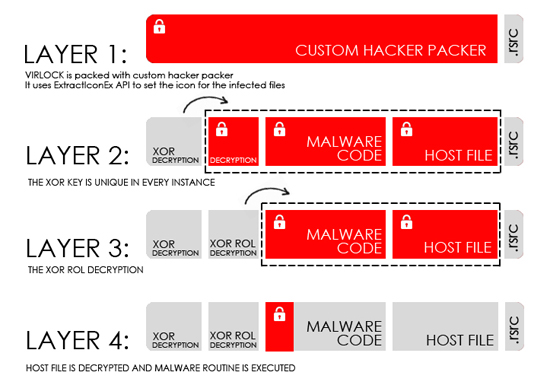
Mitigation and Protection
- Try not to be on the side of getting attacked
- Never open suspicious emails/links
- Never download files from unknown sources/senders in emails or other links
- Always check for sender's address and verify the identity first
- Always look for the appropriate content in the mail and don't be a victim of bait from attackers
- VIRLOCK has propagating capabilities, therefore users are advised limit their use of connecting removable drives to trusted computers or either use a security software on their system