 A Security firm Palo Alto Networks at Santa Clara, CA has released a press release revealing the discovery of new family of malware found in Apple devices. The Apple malware is said to be targeted at iOS devices such as iPhone, iPod, iPad and Mac OS X devices. The malware is found to exhibit characteristics unseen in any previously documented threats targeting Apple platforms. The name of the new Apple malware family is given as Wirelurker, marking a new era in malware acros Apple mobile and desktop platforms, representing a potential threat to businesses, governments and Apple customers worldwide.
Characteristic Features of Wirelurker includes:
- The first known malware family that can infect installed iOS applications similar to how a traditional virus would
- The first in-the-wild malware family that can install third-party applications on non-jailbroken iOS devices through enterprise provisioning
- Only the second known malware family that attacks iOS devices through OS X via USB
- The first malware family to automate generation of malicious iOS applications through binary file replacement
The Palo Alto Networks's threat intelligence Team's Claud Xiao of Unit 42 division discovered this Apple malware.
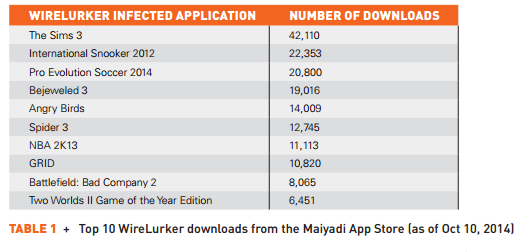
They also released a full documented report, and As per the report released by the Wirelurker was used to trojanize 467 OS X Apps on the Maiyadi App store, a third-party Mac Apps store in China. These 467 Applications have been downloaded around 356,104 times in the past 6 months and may have infected hundreds of thousands of devices.
Further accodrding to the report, "WireLurker monitors any iOS device connected via USB with an infected OS X computer and installs downloaded third-party applications or automatically generated malicious applications onto the device, regardless of whether it is jailbroken. This is the reason we call it wire lurker. Researchers have demonstrated similar methods to attack non-jailbroken devices before; however, this malware combines a number of techniques to successfully realize a new breed of threat to all iOS devices. WireLurker exhibits complex code structure, multiple component versions, file hiding, code obfuscation and customized encryption to thwart anti-reversing. In this whitepaper, we explain how WireLurker is delivered, the details of its malware progression, and specifics on its operation."
Apple Malware is capable of stealing a variety of information from the devices it infects and regularly asks for updates from attackers command and control server. This malware is under active development and its creator's ultimate goal is not yet clear. Some related information is provided in later section .
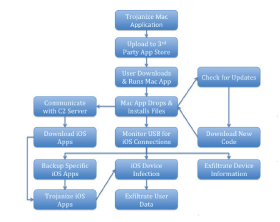
The Below diagram explains the workflow of the Malware:
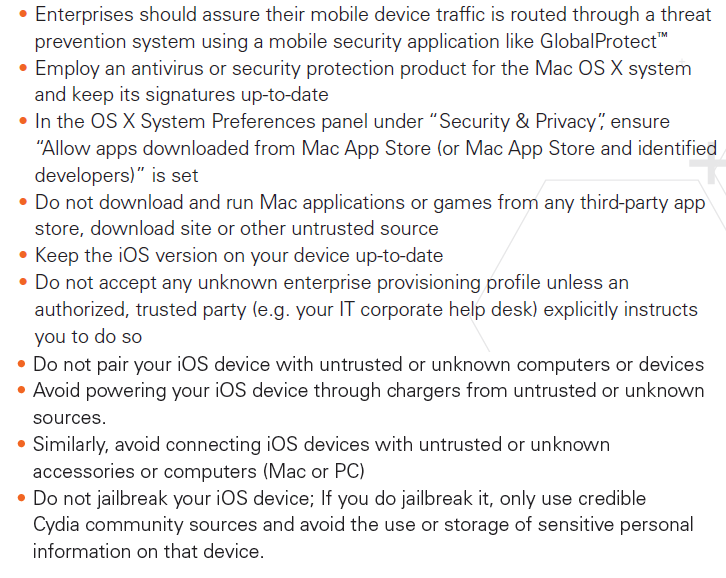
Following are the Prevention Measures as suggested by the report:
The report suggests the following Remediation for the malware:
"If WireLurker is found on any OS X computer, we recommend the deletion of respective files and removal of applications reported by the script. As of the publication date of this report, the iOS component of WireLurker is only spread through an infected Mac computer; accordingly, if WireLurker is found on a Mac, we recommend inspection of all iOS devices that have connected with that computer. A quick check for iOS devices includes determining whether any unauthorized enterprise provisioning profiles were created by navigating to Settings -> General-> Profile. If an anomalous profile is found, it should be removed and a subsequent check of all applications should be performed. Delete any strange applications found on the device. For jailbroken devices, we recommend that you check whether the file /Library/MobileSubstrate/DynamicLibraries/sfbase.dylib exists. If so, you should delete it through a terminal connection, via an application like MobileTerminal or Secure Shell (SSH)."