Researchers at Symantec came up with a new report alerting LinkedIn users to secure themselves from this LinkedIn Phishing Email campaign, going on from last one week. The LinkedIn phishing email claims to be from LinkedIn Support . The Content in the email claims that irregular activities have prompted a compulsory security update for the recipients LinkedIn account.
Irregular activities
The email further says that if the user wants to secure his/her account, they need to download the attached (an HTML file) and follow the instructions.

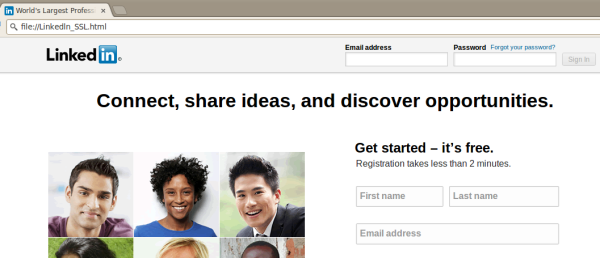
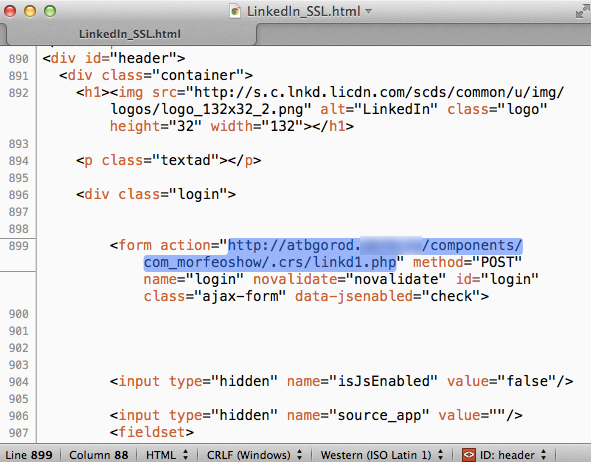
The file attached in this LinkedIn phishing email is the replica of Linkedin.com Website. However, the source file has been modified in order to get the credentials of the users, who log in at this page, directly to the hackers' room.


Evasion techniques
Curiously, these LinkedIn phishing email uses a lowercase I instead of a capital i when spelling LinkedIn. The difference in characters is indiscernible to the eye and functions as a way to evade mail filters.
However, the most important technique used here is the HTML attachment. This method bypasses browser blacklists that often flag suspicious websites to help prevent users from being phished.
Security tip: Use two step verification
LinkedIn users should consider turning on two-step verification, a true security update that provides an extra layer of security. With two-step verification enabled, even if a user's credentials are compromised, an attacker would not be able to login without having access to the user's mobile phone.
To learn more about LinkedIn's two-step verification, please visit its help center.